Texture replacement for use with element classes. More...
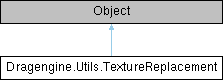
Public Member Functions | |
| void | applyToComponent (Component component) |
| Apply texture replacement to matching component texture if present. | |
| DynamicSkin | createDynamicSkin () |
| Create dynamic skin from texture replace definition. | |
| Color | getColorTint () |
| Color tint or null to not replace the color tint. | |
| String | getName () |
| Name of the texture in the component. | |
| String | getPath () |
| Path to skin or null to not replace the skin. | |
| Skin | getSkin () |
| Skin resource or null to not replace the skin. | |
| TexMatrix2 | getTransform () |
| Texture coordinate transformation or null to not replace the transformation. | |
| TextureReplacement | new (String name) |
| Create texture replace object. | |
| TextureReplacement | new (StubElementTexture stub) |
| Create texture replacement from stub. | |
| TextureReplacement | new (TextureReplacement copy) |
| Create copy of texture replace object. | |
| void | setColorTint (Color color) |
| Set color tint or null to not replace the color tint. | |
| void | setName (String name) |
| Set name of the texture in the component. | |
| void | setPath (String path) |
| Set path to skin or null to not replace the skin. | |
| void | setSkin (Skin skin) |
| Set skin resource or null to not replace the skin. | |
| void | setTransform (TexMatrix2 matrix) |
| Set texture coordinate transformation or null to not replace the transformation. | |
Public Attributes | |
| Color | pColorTint |
| String | pName |
| Skin | pSkin |
| TexMatrix2 | pTransform |
Detailed Description
Texture replacement for use with element classes.
Supports replacing Skin and DynamicSkin of a matching component texture.
If a Skin instance is present the texture defined by the component Skin instance or a manually set Skin is replaced with the new Skin instance. The first texture defined in the replacing Skin instance is used. It is possible to use skins with more than one texture but then only the first texture is used. Using a skin with no texture is possible to render parts of a component invisible.
If no Skin instance is present and no skin instance has been assigned to the component texture yet the component skin is used as skin instance with the matching texture index. This allows to easily replace the tint of a component texture no matter if a skin is explicitely set or not.
If a color tint is present a DynamicSkin is created and replaces the component or manually set dynamic skin. It is possible to use color tint without using a new Skin instance. In this case the currently used skin of the component texture is modified.
If a transform is present it replaces the component or manually set transformation if present. It is possible to use transform without using a new Skin instance. In this case the currently used skin of the component texture is modified.
Texture replacements have to be applied to a component using applyToComponent() method after setting up the component with all skin and dynamic skin instances. If no component texture matches the name the texture replacement has no effect.
To use a texture replacement in an element class use the ECPTextureReplacementList element class property.
Member Function Documentation
◆ applyToComponent()
| void Dragengine.Utils.TextureReplacement.applyToComponent | ( | Component | component | ) |
Apply texture replacement to matching component texture if present.
◆ createDynamicSkin()
| DynamicSkin Dragengine.Utils.TextureReplacement.createDynamicSkin | ( | ) |
Create dynamic skin from texture replace definition.
If no dynamic skin is required null is returned.
◆ getColorTint()
| Color Dragengine.Utils.TextureReplacement.getColorTint | ( | ) |
Color tint or null to not replace the color tint.
◆ getName()
| String Dragengine.Utils.TextureReplacement.getName | ( | ) |
Name of the texture in the component.
◆ getPath()
| String Dragengine.Utils.TextureReplacement.getPath | ( | ) |
Path to skin or null to not replace the skin.
◆ getSkin()
| Skin Dragengine.Utils.TextureReplacement.getSkin | ( | ) |
Skin resource or null to not replace the skin.
◆ getTransform()
| TexMatrix2 Dragengine.Utils.TextureReplacement.getTransform | ( | ) |
Texture coordinate transformation or null to not replace the transformation.
◆ new() [1/3]
| TextureReplacement Dragengine.Utils.TextureReplacement.new | ( | String | name | ) |
Create texture replace object.
◆ new() [2/3]
| TextureReplacement Dragengine.Utils.TextureReplacement.new | ( | StubElementTexture | stub | ) |
Create texture replacement from stub.
◆ new() [3/3]
| TextureReplacement Dragengine.Utils.TextureReplacement.new | ( | TextureReplacement | copy | ) |
Create copy of texture replace object.
◆ setColorTint()
| void Dragengine.Utils.TextureReplacement.setColorTint | ( | Color | color | ) |
Set color tint or null to not replace the color tint.
◆ setName()
| void Dragengine.Utils.TextureReplacement.setName | ( | String | name | ) |
Set name of the texture in the component.
- Version
- 1.29
◆ setPath()
| void Dragengine.Utils.TextureReplacement.setPath | ( | String | path | ) |
Set path to skin or null to not replace the skin.
◆ setSkin()
| void Dragengine.Utils.TextureReplacement.setSkin | ( | Skin | skin | ) |
Set skin resource or null to not replace the skin.
◆ setTransform()
| void Dragengine.Utils.TextureReplacement.setTransform | ( | TexMatrix2 | matrix | ) |
Set texture coordinate transformation or null to not replace the transformation.
Member Data Documentation
◆ pColorTint
| Color Dragengine.Utils.TextureReplacement.pColorTint |
◆ pName
| String Dragengine.Utils.TextureReplacement.pName |
◆ pSkin
| Skin Dragengine.Utils.TextureReplacement.pSkin |
◆ pTransform
| TexMatrix2 Dragengine.Utils.TextureReplacement.pTransform |
The documentation for this class was generated from the following file: